Proud partner

Proud partner
Article


Although many companies often focus their SEO strategy on achieving a high ranking in regular search results, it’s also important to secure a good position via Google Images. People process visual images extremely quickly, so you certainly shouldn’t underestimate the importance of Google Images. But how do you actually ensure you achieve that top position in Google Images results? In this blog, we’ll give you a number of useful tips that will definitely help you improve your visibility on Google.
Think about it: when you’re looking for a great holiday destination or a nice decorative item for your wall, you’ll probably head to Google Images. The advantage of this is that you immediately get a visual impression of a topic. As a business, it is therefore important to rank in Google Images too. This is an additional way to generate even more traffic to your website, but that’s not all. These are the benefits of Google Images:
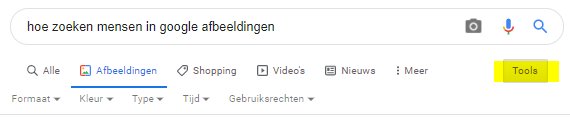
Are you curious to find out what the optimisation tips are for Google Images? We’ll keep you in suspense for a little while longer, as it’s important first to understand how people actually search. Of course, you can type specific keywords into Google’s search bar, but it doesn’t stop there. When people are looking for something specific, they often use the ‘Tools’ option as well. As you can see, this allows them to filter even further until they find the right image.
In short: the ‘Tools’ option allows people to search very specifically for a particular image. This is good to know – keep it in mind when reading our top Google Images optimisation tips.
It’s also worth noting that people first click on an image, after which they see a sort of preview of that image. Similar images always appear below this. These may be from your own website, but they could also be images from a competitor. So be aware of this and try to make your visuals stand out.
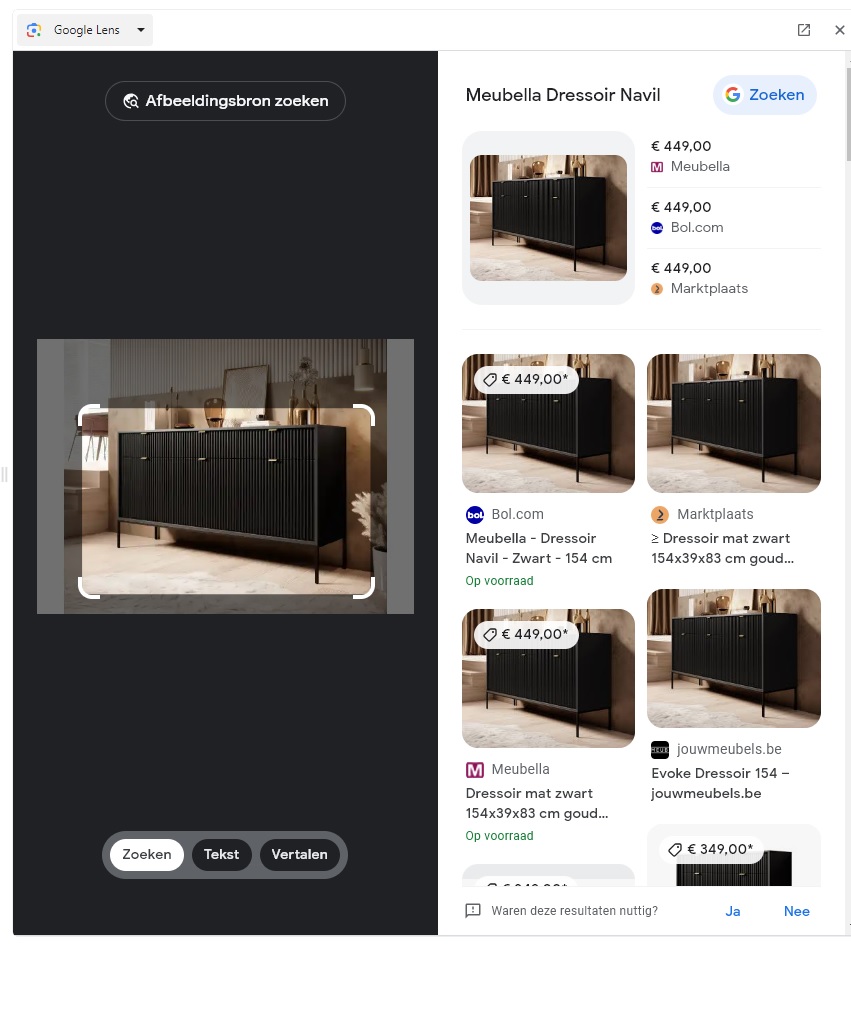
There are also those who want to use Google to search for a specific image. This is known as a ‘reverse image search’. Here, you use an existing image – for example, one on a website – to find a similar image. Google Lens then selects the most important part of the photo, after which the search engine displays similar photos. This can be useful, for example, if you want to know the name of a plant or simply can’t remember the name of an animal. Customers also sometimes use it to check whether that particular jumper is cheaper elsewhere. Searching for an image on Google is therefore something people are doing more and more often.
But how do you actually ensure that you rank in Google Images? Fortunately, there are a few tricks for this that we’d love to share with you. Watch and learn!
One of the most important factors for ranking in Google Images is giving the file the right name. Include the keywords you want to be found for in the file name. For example, if you have an image of a green velvet sofa, you could name the file green-velvet-sofa.jpg.
In your CMS, you can add what is known as an ‘Alt tag’ to an image. An Alt tag also stands for ‘alternative text’. This is actually intended as text that is displayed when an image cannot be loaded. Google reads the alt text and therefore knows what sort of image is displayed on a page. Google links this to the search results, meaning that an image is more likely to be displayed if it has a relevant alt tag.
Please note that there are a number of points you need to bear in mind if you wish to add an alt tag to your image. Below, you will therefore find a few guidelines to help you understand what to consider.
Another way to rank higher in Google Images is by creating a separate sitemap. Here, you can list the images you have online.
A picture is worth a thousand words. A good picture is worth even more. If you want to be found via Google Images, it’s important that you stand out from the other images. So always make sure you choose high-quality images. Don’t currently have any good-quality images of your business or your products? Why not hire a photographer? It might be a bit of an investment, but you can really put your images to good use in so many ways. Not only will your website instantly look much more polished, but you can also use many of the photos for social media.
The larger the images on your website, the longer it takes for them to load. This is not beneficial for Google’s searchability, as it has a negative impact on your ranking in the search results.
So make sure you don’t upload images that are too large to your website. There are various online tools you can use for this, such as Pixlr Editor, but it’s also possible to do this using Photoshop, of course. Do bear in mind, however, that your image shouldn’t be too small either; a website visitor should still be able to see what’s on display without having to reach for a magnifying glass.
Lossless image compression means reducing the file size of images without compromising on quality. This therefore helps to improve image loading times. There are several tools available for this, such as:
Everyone is familiar with JPEG and PNG files. These are excellent formats for saving your images. However, JPEG and PNG files can take up slightly more space than certain other file types. A good example is WebP. On average, this file type is 26 per cent smaller than PNG and 25 to 36 per cent smaller than JPEG. WebP is supported by 70 per cent of all browsers. It is important to bear in mind, however, that not everyone will be able to load the images straight away. How can you solve this? Include a fallback option for unsupported browsers. In such cases, an alternative version (JPEG or PNG) of the image will be loaded. This ensures that there is always
As well as wanting your images to appear in Google Images, you also want your photo to stand out amongst the search results. A stock photo generally doesn’t stand out very easily in Google Images. You can often tell when something is a stock photo, which means people might be less likely to click through to your website. Our advice is therefore to make the most of original content wherever possible. Another advantage of this is that people may have a negative association with your stock photo. For example, if another company has used the same photo online and someone has had a negative experience with it, they may project this onto your company.

Would you also like to rank highly in Google Images search results? After reading these tips, you’re sure to be a lot wiser. Of course, you may still have questions about this topic or about, for example, general optimisation, link building or search engine advertising. Please feel free to get in touch with us. We’d be happy to tell you more and help you ensure your images achieve a top position in Google Images!




Our team is
ready to help you