Proud partner

Proud partner
Article


When writing content, it is important to create something that people will find interesting. Content is important for search engines, so that Google understands what a page is about. Furthermore, content that is useful or engaging is likely to be shared or cited. Effective content marketing depends on creating useful and engaging material, but even the best article will go unread if it doesn’t answer the question being asked. It is therefore important to start with keyword research, so that you know exactly what your target audience is looking for. This is where Answer The Public comes in.
What is Answer The Public?
The name of the tool gives a bit of a clue. ‘Answer The Public’ is an online tool that identifies relevant search terms and generates content ideas on a specific topic. This tool collects data from Google and Bing and then visualises it in a handy infographic. Why is it useful for an online marketer to know what people are searching for on Google? There are several reasons for this:
With thorough keyword research, carried out using the right tools, you can gain insight into what your potential customers are searching for. From there, you can guide potential customers towards a sale or conversion.
How does it work?
It’s incredibly simple, and anyone can use this tool. Follow these steps to carry out a search:
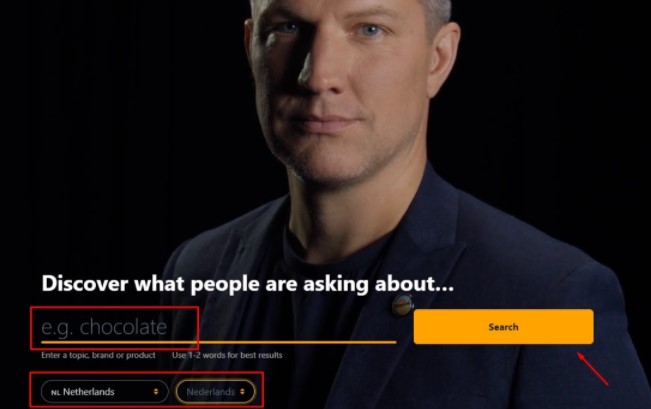
As you scroll down, you’ll see a lot of data, sections and buttons. This might seem overwhelming, but fortunately the interface has a number of handy views and features to organise the large amount of information. The search terms are displayed visually in the form of questions about the topic, prepositions and comparisons. Each section has two views: visualisation and data. Although the default setting is a visual layout, you can also choose to switch the view to a table. To use this view, click on the ‘data’ tab.
Now that you know how to navigate the pages, you can scroll down to view the five different sections. Each section contains unique information that you can use to create great content.
At the bottom of the page, there will also be an alphabetical list of search terms related to the topic, along with a visualisation of related topics and search queries.
When should you use it?
It is useful to use this tool during the exploratory phase – for example, for keyword analysis or analysing competitors. At this stage, you want to gather as much information as possible on the subject. This tool can help you do just that.
You can also use the tool when writing copy. For example, you can easily determine the subheadings and topics for your blog before you start writing.
Finally, you can also use it to find out more about your target audience. What do people think and what are they looking for? What do they consider important? This tool provides you with greater insights into these questions.
Free version / paid version
In the free version, you can carry out a maximum of 3 searches per day. You can also opt for the paid version. The paid version consists of a monthly subscription, cancellable at any time, costing $99 per month, or an annual subscription, cancellable at any time, costing $79 per month. With the paid version, you have access to the following additional features:
Advantages and disadvantages of AnswerThePublic
Now that we’ve clarified what the tool is, how it works and which versions are available, I’d like to outline the pros and cons for you.
Benefits
Disadvantages
The free version of Answer the Public does not provide insights into the popularity of specific keywords. The paid version does offer these insights. It also shows the level of competition for each keyword.
Another drawback is that the English version provides far more suggestions than the Dutch version. For example, the search term ‘marketing’ yields far more results when the language setting is set to English than when it is set to Dutch. Even if you have the language setting set to Dutch, you will sometimes still see English search terms appearing alongside certain search terms.
The visual web is structured in such a way that all suggestions for long-tail keywords focus on ‘how’, ‘what’, ‘where’ and ‘why’. It also sometimes provides predictable answers, as a sentence is constructed around a keyword. This data is sourced from Google and Bing. Furthermore, the visual web is rather awkward to read and would be better presented in a list or table. Finally, it is a pity that no more than two search terms can be entered. As a result, the results remain very general and standard, meaning you are unlikely to come up with many innovative ideas.
Conclusion
It is purely a list generated by Google’s auto-complete feature, using a fixed template. The results from the tool cannot be compared to how we humans search, make connections, complete keywords, etc. You’re better off brainstorming the old-fashioned way with a sheet of A4 paper. In addition, you can use many other tools to come up with new, original content. Think of the customer journey, personas, market research, etc. Anwer The Public fails to offer any added value (with the free version).
The visual interface feels restrictive, the language settings leave much to be desired, and the suggestions are often very general and irrelevant. For the price of the paid version, you’d be much better off looking for other tools. There are plenty of alternatives to Answer the Public that can provide you with much better insights. Consider Ahrefs and SEMrush, for example. For the same price, these offer far more options and insights.




Our team is
ready to help you