Proud partner

Proud partner
Article

At Traffic Today , we use Channable extensively: a paid feed management and Google Ads tool. But what exactly do we use this platform for, and what can we actually do with it? Advertising specialist Marc explains.
By ‘feed management’, we mean all activities aimed at managing, optimising and adapting product data feeds for online sales channels and advertising platforms. These feeds contain key product information, such as titles, descriptions, prices and images, and are used for various purposes, including online shopping, advertising and price comparison sites.
Feed management tools enable companies to structure their product information and adapt it to the standards of the advertising channel, ensuring it is suitable for specific sales channels and campaigns. This is because the specifications differ from channel to channel. By investing time in feed management, you increase the visibility of products on channels other than your own online shop.
With feed management tools such as Channable, feeds can be created for various platforms. These include Google Shopping, Beslist.nl, Marktplaats.nl, etc. The difference compared to feed plug-ins within your e-commerce environment lies in the possibilities offered by tools such as Channable. For example, we can use rules to customise product names, descriptions and other variables. This includes adding extra keywords to your product title or new variables for each product.
We can also use rules to determine which products and/or categories are included in the feed and which are not. For example, do you want to list only products with a retail price above 20 euros on Bol.com, or only products with a stock level higher than 5? With Channable, you can configure this.
For each platform, the variables in Channable must be linked to the variables as they appear on the website. At Beslist, for example, the variable for the image URL is ‘url_productplaatje’, but on your online shop this is likely to be ‘image_link’. These must first be linked together so that your products can be read. The product category must also be linked to the platform’s category.
By using API integrations, your products can be listed directly on marketplaces and updated automatically. Through various rules, you can decide for yourself which products and/or categories you offer on platforms such as Bol.com. Orders from marketplaces such as Bol.com, eBay and Amazon are forwarded directly to your e-commerce platform.

Once you have established the link, created your rules and linked the variables together, you can then see how many of your products are ready to be forwarded to the platform. You can also see which products cannot be forwarded and the reasons why they have been rejected.

As well as generating sales via external marketplaces, it is also possible to offer your products via feeds on affiliate websites, such as Kieskeurig and Vergelijk.nl, and within the Google Shopping network.
The feeds and APIs are refreshed daily to ensure that all your listings remain up to date. You can set the time at which this takes place yourself in the settings.
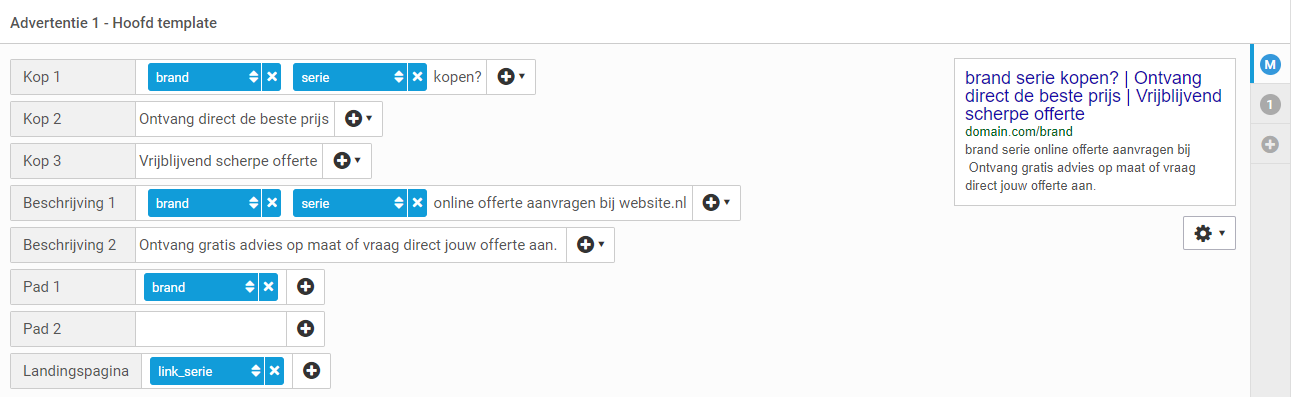
As well as generating product feeds and setting up API integrations, Channable offers a handy Google Ads tool. The Google Ads tool allows you to create dynamic campaigns based on your product range. For example, you can create a campaign targeted at each brand name – one brand per ad group. This means you don’t have to build ad groups manually; instead, they are all created dynamically.

The various tabs shown in the image are used to configure the adverts, keywords and other targeting settings. Here, too, you have the option to load various dynamic variables. For example, you can dynamically load the product title into heading 1 and the price into heading 2. It is possible to add dynamic variables to the ad builder alongside regular text.
This makes it possible to generate adverts for all your products using a number of advert templates, which are also kept up to date via dynamic variables. Just as with feeds and API integrations, you can use rules to exclude certain products or modify variables. We can use a main template and backup templates for this. If the main advert cannot be created – for example, due to too many characters in the headline – the backup advert is automatically generated. Thanks to this feature, you are guaranteed to have adverts in your ad group.
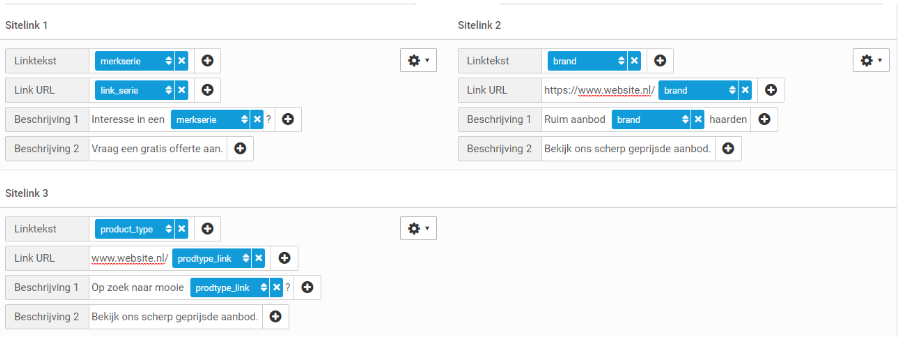
We have recently also been able to add dynamic sitelinks to our dynamic Google Ads campaigns built via Channable. Thanks to dynamic sitelinks, we can be even more relevant to every search query.
Channable is ‘by far’ the most widely used feed management tool in the Netherlands. Nevertheless, it does not hold a monopoly, and there are other tools you can use as well.
GoDataFeed, ChannelAdvisor, Adtomic and Koongo are often mentioned in the same breath as the other feed management tools.
Are you curious to find out what we can achieve for you with feed management? Please feel free to get in touch with us.




Our team is
ready to help you