Proud partner

Proud partner
Article
Summary
In August 2025, Google launched an advanced AI image model under the name Gemini 2.5 Flash Image, better known as ‘Nano Banana’. In a short space of time, Nano Banana has been embraced worldwide. Users are experimenting with it en masse. But how exactly does it work?
Nano Banana is the name of Google’s latest image model, officially released as Gemini 2.5 Flash Image. The model has been developed not only to generate images, but also to edit them whilst preserving recognisable details such as faces, objects and text, even when multiple edits are carried out in succession or the style and context change completely.
Whereas previous models often struggled with consistency – for example, when recognising the same person or object again – Nano Banana tackles this problem more effectively. The model is now available via the Gemini app and Google AI Studio. Both free and paying users can get started with it straight away.
Yes, using Nano Banana is completely free. However, as soon as you want to use more features, you’ll need to pay. The rate is $30 per 1 million output tokens, which works out at around $0.039 per image. Everything you have generated is automatically given an invisible watermark and passes through a number of security filters. We therefore recommend that you always start with the free version first. Test how it works for you and see if you’re happy with the output.
To get the most out of Nano Banana, it’s a good idea to understand what’s possible and how best to formulate your prompts.
Don’t just describe the subject, but also the setting, emotions, colours and atmosphere. The more details you add, the better the model will understand your intention. Think not only about the content, but also about the visual style. Specify whether you want a photorealistic image, a painterly style, a retro look or, conversely, something futuristic. Also specify the composition (close-up, panoramic, portrait) and the aspect ratio (for example, 16:9 or 2:3).
Nano Banana excels at merging multiple photos. Place a product in an interior, add yourself to a holiday photo or combine individual elements to create an entirely new scene. Clearly specify which elements are to be brought together and in what style.
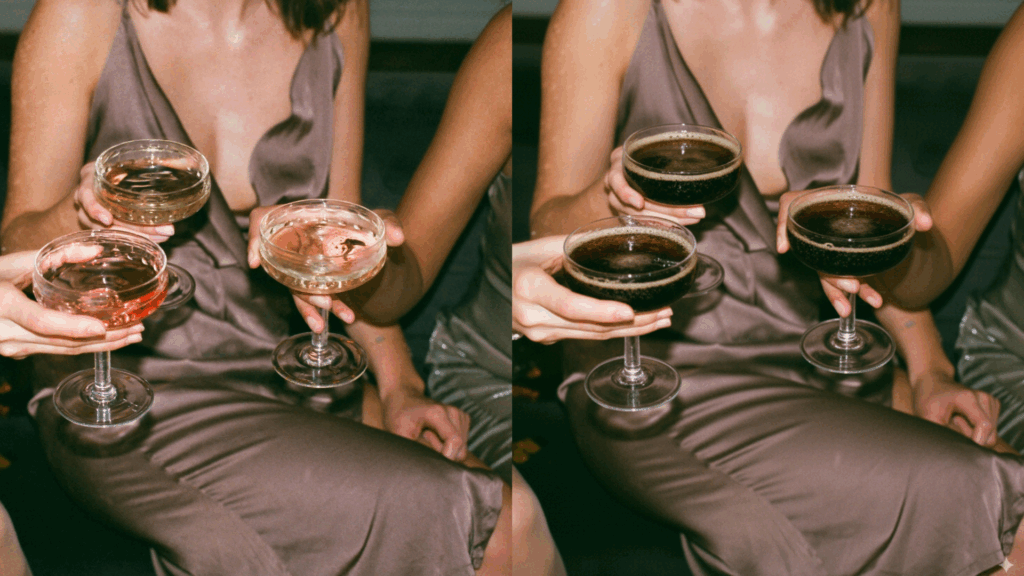
Here’s an example for inspiration: in the photo on the left, you can see people toasting with champagne. We gave Nano Banana this atmospheric image as a basis, asking whether the toasting could be done with cola instead of champagne. Et voilà: the result is on the right. If you look a bit closer, you’ll see the watermark in the bottom right-hand corner. This isn’t present in the paid version.
One of Nano Banana’s greatest innovations is Character Consistency. Thanks to this technique, the model can consistently render recognisable faces, animals or objects, even across different scenes or styles. This means you can feature a character in multiple situations without altering its core characteristics. This makes it ideal for branding, storytelling and personal creations, as the model automatically maintains consistency.
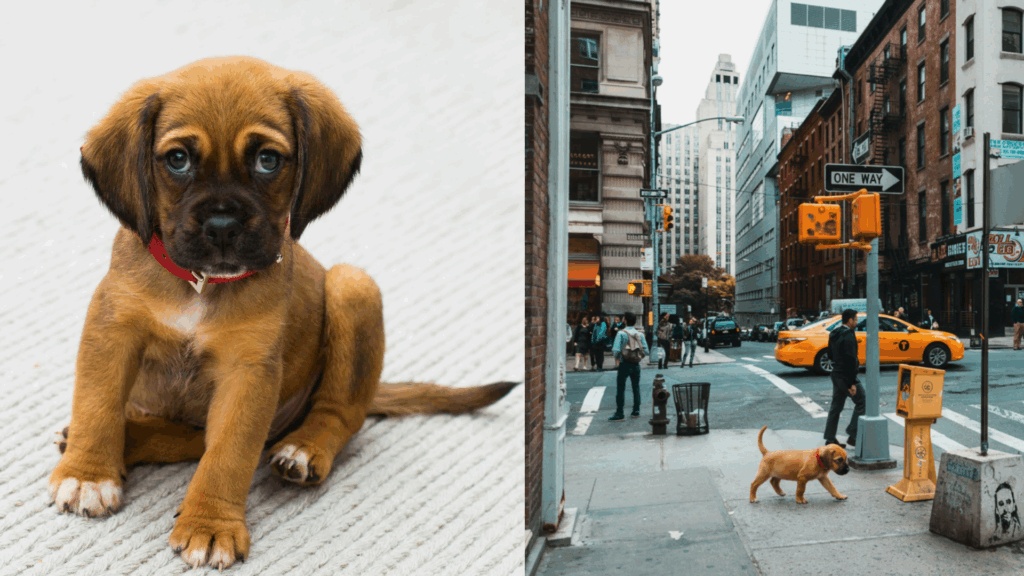
Here’s an example to inspire you: in the photo on the left, you can see a dog. In the photo on the right, that same dog is walking through New York. Please note: do make sure you specify exactly what you expect. In this case, we explicitly stated that we wanted the dog to be walking, not looking at the camera, and depicted smaller than in the original photo.
If a result isn’t quite what you want, you don’t have to start from scratch. Ask Nano Banana to adjust the background, replace an object or refine the details. The model remembers previous edits, allowing you to perfect your image.
Midjourney, Sora and now Nano Banana: the world of AI image generation is evolving rapidly. Not so long ago, whenever you generated an image, it was obvious that it was AI-generated (hello, strange hands and illegible text on a product). But now? Now it’s really hard to tell AI from the real thing. AI image models are getting better and better, to the point where you almost want to take your hat off to AI when you see the output.
Still, it all comes down to the prompt you provide yourself. This remains a human process. And yes, you can ask ChatGPT to generate your prompt, but you are – and always will be – the creative director of your visual. So think carefully: how does your product stand out? And what suits your brand? In a world where image generation is becoming increasingly easy, it is precisely that touch of creativity that is becoming ever more important. That’s how you set yourself apart from the competition.
We will certainly be exploring the tool in greater depth in the coming period. Do you have any questions about the tool, or are you curious to find out what we can do for you in the field of AI image generation? Please feel free to contact us.



Our team is
ready to help you