Proud partner

Proud partner
Article

Duplicate content is a widespread problem. In fact, up to 25 per cent of all pages on the crawlable web are duplicates. Partly for this reason, it is a myth that Google penalises websites for duplicate content. But is it actually a problem? And if so, what are the risks?
We’ll answer that in this blog, because it’s certainly not a positive thing. First of all, we need to distinguish between internal duplicate content and external duplicate content. Content on your own site is, of course, easier to resolve than external content, but you’re never completely out of luck. In this blog, you’ll read how to detect duplicate content, what the risks are and what you can do about it.
When Google crawls your site and sees that two pages are very similar, Googlebot can become confused. It will then choose the page that Google considers most relevant to index, but this may not necessarily be the page you want indexed for that keyword. The result is that traffic may be directed to a non-optimised page, leading to a very high bounce rate.
When two very similar pages attempt to be indexed for the same keyword, this is referred to as internal competition. Another term for this in the SEO world is ‘cannibalisation’, as the pages effectively ‘eat away’ at each other’s relevance.
If Google becomes confused due to duplicate content, this can affect the ranking of all pages that rank for that keyword. In fact, in severe cases, all pages may be removed from the index until the problem is resolved. An extra incentive to sort it out quickly!
Duplicate content can cause significant damage to your website, yet it is relatively easy to resolve. However, before you can resolve the issue, you must first identify the affected pages.
It’s very useful to have your website crawled by a tool that can detect technical errors, such as Semrush, Ahrefs and, of course, Screaming Frog, about which we’ve written another blog post. The first signs that a site is dealing with duplicate content are when the same meta description, page title and H1 tag keep appearing. In particular, if multiple URLs containing the same keyword appear, this is a strong indication that we are dealing with similar pages.
Let’s take a hotel website as an example. Suppose you have a hotel in Deventer and are creating all sorts of landing pages to target more keywords and improve the website’s search engine ranking. The URLs of these landing pages are as follows:
These landing page URLs are so similar to one another that it is likely there is duplicate content. An inspection of the actual pages should confirm this.
Of all the tools that crawl a website, Ahrefs is the favourite for this specific task. Whilst all crawlers analyse meta tags and the like, Ahrefs displays a very handy and clear map when duplicate content is detected. The map shows that Google is indexing a different URL each time for a single site and for the same keyword.
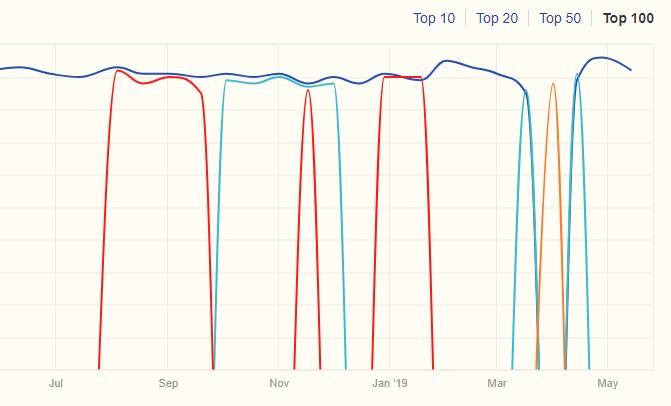
Each different colour indicates a different URL that is indexed for the same term. It is clear from this that when a different URL is indexed for the same keyword, another URL disappears from the index.
Google introduced canonicals to prevent this problem. A canonical tells Google that two pages are so similar that they are considered duplicates, and only one of the two should be indexed. The value of the canonicalised page is transferred to its ‘twin’, but the page remains accessible.
A 301 redirect is used to redirect one page to another. Just like with a canonical tag, a 301 redirect transfers a page’s value to another page, but unlike a canonical tag, the page being redirected remains inaccessible.
Sometimes it can be beneficial to resolve the duplicate content issue simply by adapting the content. If you realise that two (or more) pages are currently ranking for the same keyword, but that the page could also be rewritten to rank for a different (related) keyword, this is certainly worth considering. It can take a very long time for a completely new page to be indexed, whereas it can take much less time for Google to revisit an existing page whose content has been updated. Furthermore, existing pages often already have backlinks from other pages on the website or even from external sources.
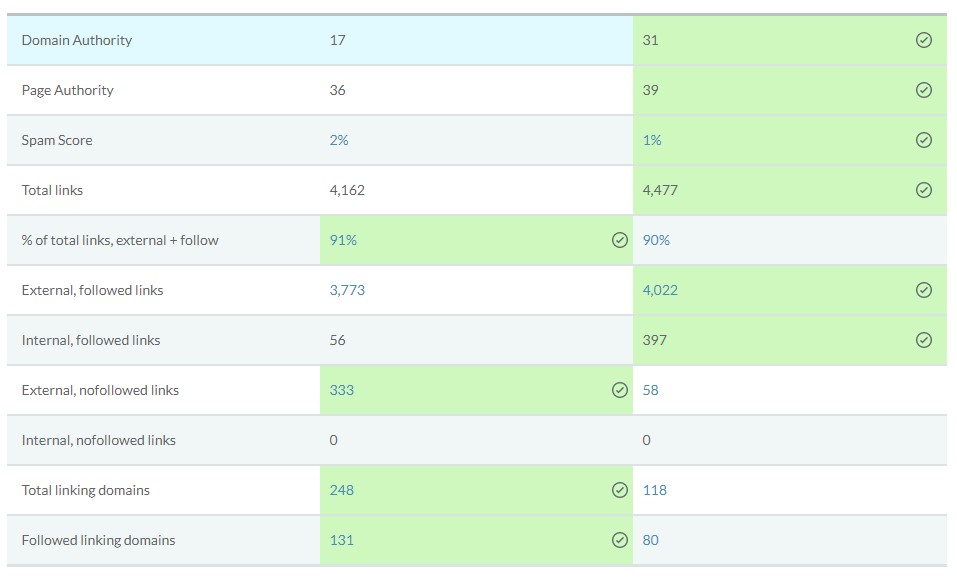
This is a common problem, and often it isn’t at all clear at first glance which URL has the most authority and which ones should be canonicalised. Fortunately, MOZ has an excellent tool for this, which shows you in a clear overview which page has the most authority. Among other things, the tool shows which page has the most external and internal links, its spam score and more. That makes the choice a quick one!
A meta tag that can be particularly useful when dealing with duplicate content is the meta-robots tag, with the values “noindex, follow”. This meta-robots tag is added to the HTML header of each individual page that is to be excluded from a search engine’s index.
<p>General format:</p><Head>
<meta name = “robots” content = “noindex, follow”>
The meta-robots tag allows search engines to crawl the links on a page, whilst preventing them from including those links in their search indexes. It is important that the duplicate page can still be crawled, even if you tell Google not to index it, as Google explicitly warns against restricting crawl access to duplicate content on your website.) The use of meta-robots is a particularly good solution for duplicate content issues relating to pagination.
Another way to exclude pages from indexing is to use the robots.txt file. Here, pages and entire subfolders can be excluded from indexing. You can do this by adding ‘Disallow: /page-name/’ to the robots.txt file. This tells Google not to include this page in the search index.
With Google Search Console, you can set your site’s preferred domain (for example, http://jouwwebsite.nl instead of http://www.jouwwebsite.nl) and specify whether Googlebot should crawl different URL parameters differently (parameter handling).
Depending on your URL structure and the cause of your duplicate content issues, setting your preferred domain or handling parameters (or both!) may provide a solution.
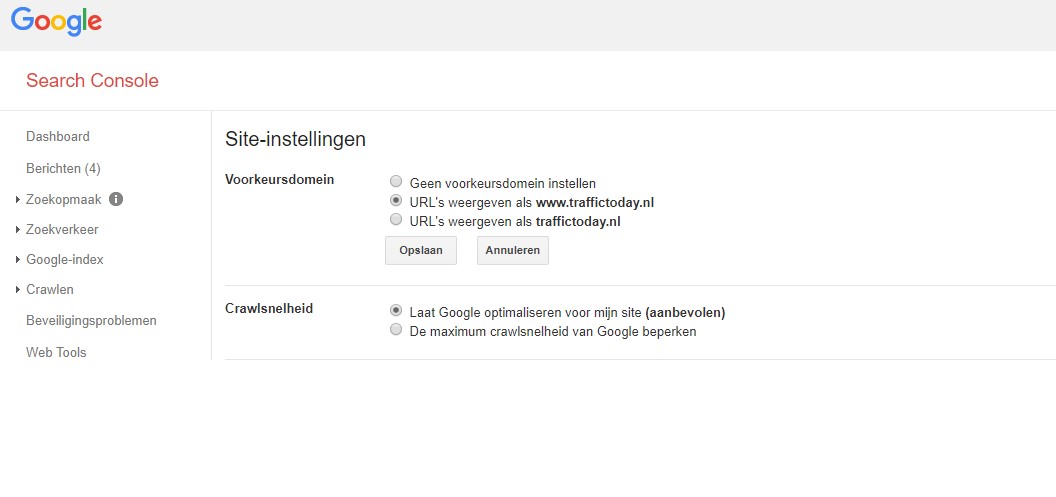
The main drawback of using parameters as the primary method is that the changes you make only work for Google. Rules set up using Google Search Console do not affect how Bing or the crawlers of other search engines interpret your site.
It can be incredibly frustrating to spend time and effort creating attractive and original content for your website, only to discover that it has been duplicated by another site.
Because when it comes to website content, plagiarism (in the form of duplicate content) can have a negative impact on rankings, traffic and, ultimately, conversions. And although it may seem like a hopeless situation, there are steps you can take to address it.
It is not only the deliberate theft and copying of content that can lead to external duplication; automatic scrapers or content syndication can also result in multiple copies of your content.
Google’s aim is to provide users with the best possible user experience. To achieve this, they do not want their users to see identical information repeated within the same search results. This means that, where identical information exists, they must decide which version of the content to display in their search results.
But why can’t Google tell which piece of content is the original? You’d think they’d know which page was indexed first and then treat that page as the original. Unfortunately, this doesn’t seem to work in practice. We know from experience that rankings are often lost after content has been copied.
We use Copyscape, which is a brilliant tool for finding external duplicate content. You simply paste the URLs into the search box and voilà – you’ll see all the pages on the internet with content that’s just a little too similar to yours (or completely identical). Another handy tool is Grammarly. This works really well and is very easy to use.
Although this may take some time, it is the most effective way to find duplicate content without using an online tool. It’s actually very simple – you just need to paste parts of your content into the Google search bar (no more than 1–2 sentences) and press Enter. You can also add quotation marks to the search query to find content that is completely identical.
This step may seem a little trivial, but it is important to address the website’s duplicate content. Firstly, those responsible may not even be aware of the problem, which means it could, for example, be the fault of a lazy copywriter. Secondly, even if those responsible have deliberately duplicated your content, they may have no idea of the potential negative effects.
In your email, try to be clear about what content is involved and what you want removed. It is also wise to specify exactly how long the recipient has to remove it and what the consequences will be if they ignore the request.
By submitting a request under the Digital Millennium Copyright Act, you are asking Google to remove pages containing duplicate content from the Google index.
So no, they can’t actually remove the content from the duplicate website, but if it doesn’t appear in the Google index, it’s as good as gone (and, more importantly, it no longer affects your rankings).
You can do this on this specially designed Google page. Here, you can follow all the steps to submit a successful request to Google to have content removed. In our experience, Google usually responds within 4 days. That’s actually very quick.
If you wish to add an extra layer of security against content scrapers automatically stealing and distributing content, it is advisable to add a self-referential rel=canonical link to your existing pages. This is a canonical tag that points to the URL where the content is already hosted, with the aim of thwarting the efforts of certain scrapers.
Although not all web scrapers use the full HTML code, some will. For those that do, this canonical tag ensures that the version of your site is recognised as the ‘original’ piece of content.
Imitation may well be a great compliment to your written content, but it is simply a problem for the average webmaster, as it can have a very negative impact. Internal or external duplication will therefore need to be resolved!
We have seen immediate improvements on our clients’ websites after Google removed duplicate content from its index or after we resolved internal duplication. It is therefore important to take swift action! If you’d like help with this, we’re always happy to assist you!



Our team is
ready to help you